Free Monthly Budget Tracker & Dashboard (Excel Template)
- Home /
- Free Templates /
- Free Monthly Budget Tracker & Dashboard (Excel Template)
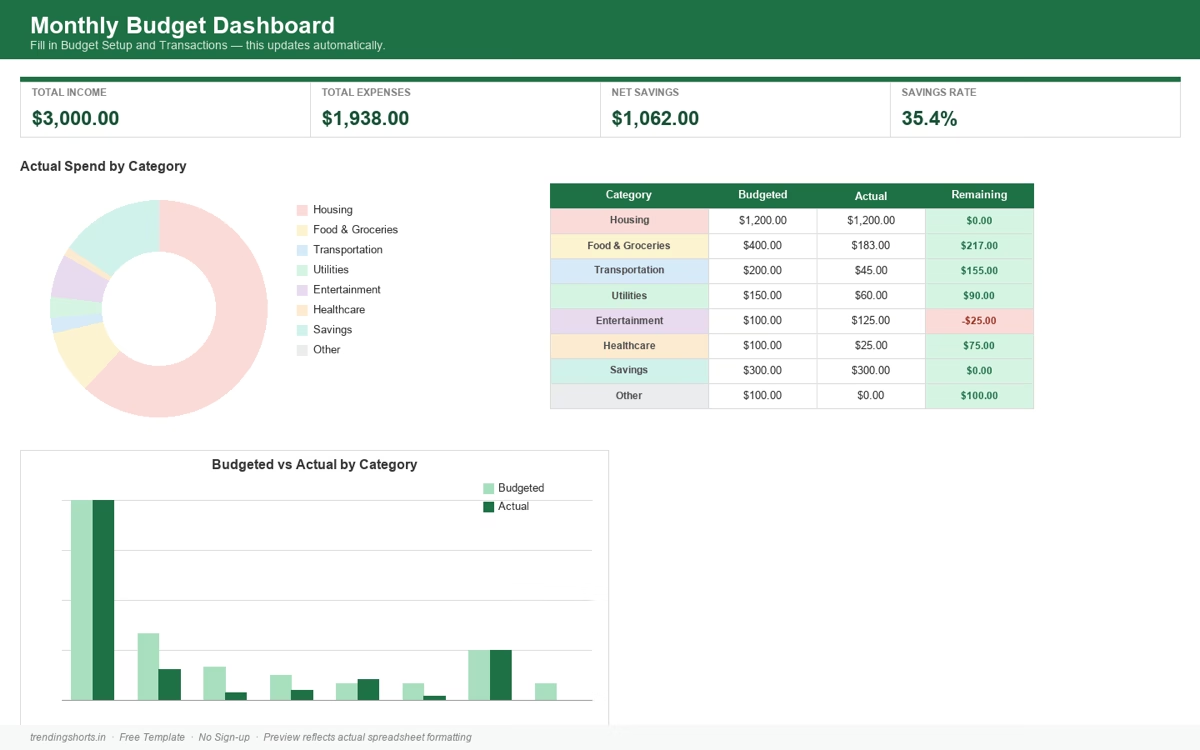
A free Excel budget tracker with a real, auto-calculating dashboard — not just a blank grid. Enter your transactions once, and the dashboard updates itself.
What’s Inside
- Dashboard sheet — total income, total expenses, net savings, and savings rate, calculated automatically.
- Category breakdown — budgeted vs. actual spend per category, with a donut chart and a bar chart, color-coded to match the category badges throughout the sheet.
- Overspend warnings — any category you’ve gone over budget on is automatically highlighted in red; categories still within budget show green.
- Budget Setup sheet — set your own monthly budget per category (Housing, Food & Groceries, Transportation, Utilities, Entertainment, Healthcare, Savings, Other).
- Transactions sheet — dropdown menus for Category and Income/Expense, so data entry stays consistent.
- Comes pre-filled with sample data so you can see exactly how it works before entering your own.
How to Use It
- Download the file below and open it in Excel (or Google Sheets, LibreOffice Calc, etc. — it’s a standard
.xlsxfile). - Delete the sample rows in the Transactions sheet and enter your own — or keep them as a reference while you learn the layout.
- Adjust your category budgets in the Budget Setup sheet.
- Check the Dashboard sheet any time — everything updates automatically as you add transactions.
Download
No email required, no sign-up — just download and use it.